You can try the following:
- Check the spelling
- Try another search

If you have received a personal code from your healthcare provider, you can add it to the Patient Journey App.
If you have used this code, you will see information that is relevant to you per treatment.
On this page you can read how to activate the code in the app.
If you have not received a personal code, it is also possible to use the Patient Journey App without a code. You can read how to do this here: Getting started with the Patient Journey App
You can also contact your doctor to request a personal code.
Download and install the Patient Journey App.
If you are using an iOS (Apple) device, please go to the Apple App Store.
Click here for the Patient Journey App for iOS
If you have an Android (Samsung, Nokia, Oppo) device, go to the Google Play Store.
Click here for the Patient Journey App for Android
After downloading the app, you can open it.
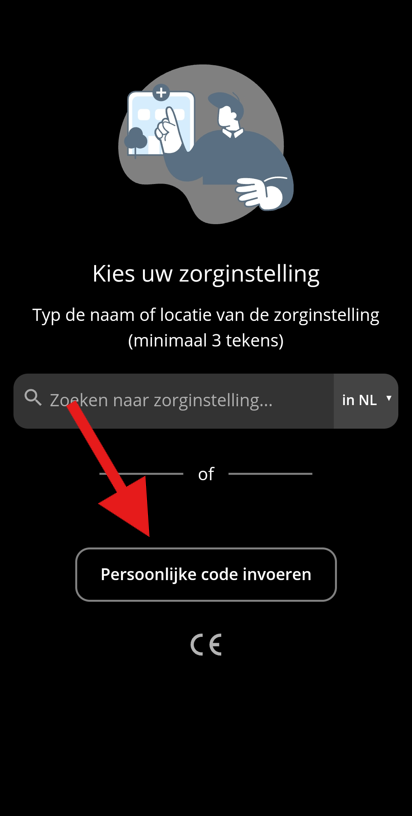
On the first screen you see, press 'Enter personal code'.
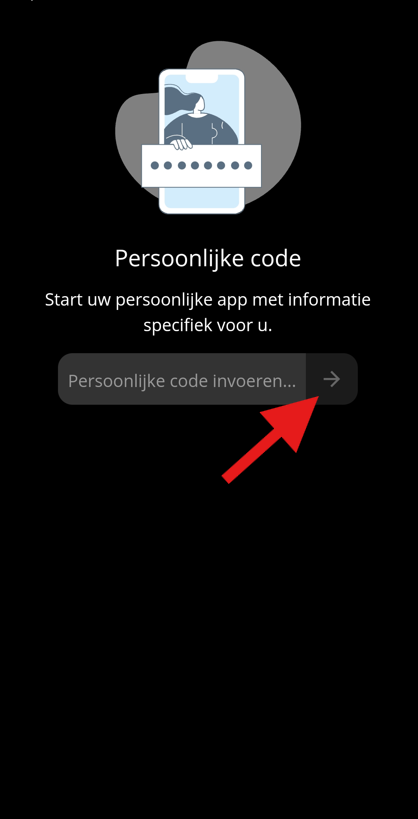
Now you can enter your personal code.
Then press the arrow pointing to the right.
Are you getting a message that the code is incorrect?
Then check the code you entered for spelling errors. Is the code written correctly? Then you must request a new one from your practitioner.